Actual UI, not route boxes
Inspect captured desktop and mobile screens on the same canvas as the paths between them.
See every discovered screen and path. Review the real product as a whole, then copy precise changes back to your coding agent.

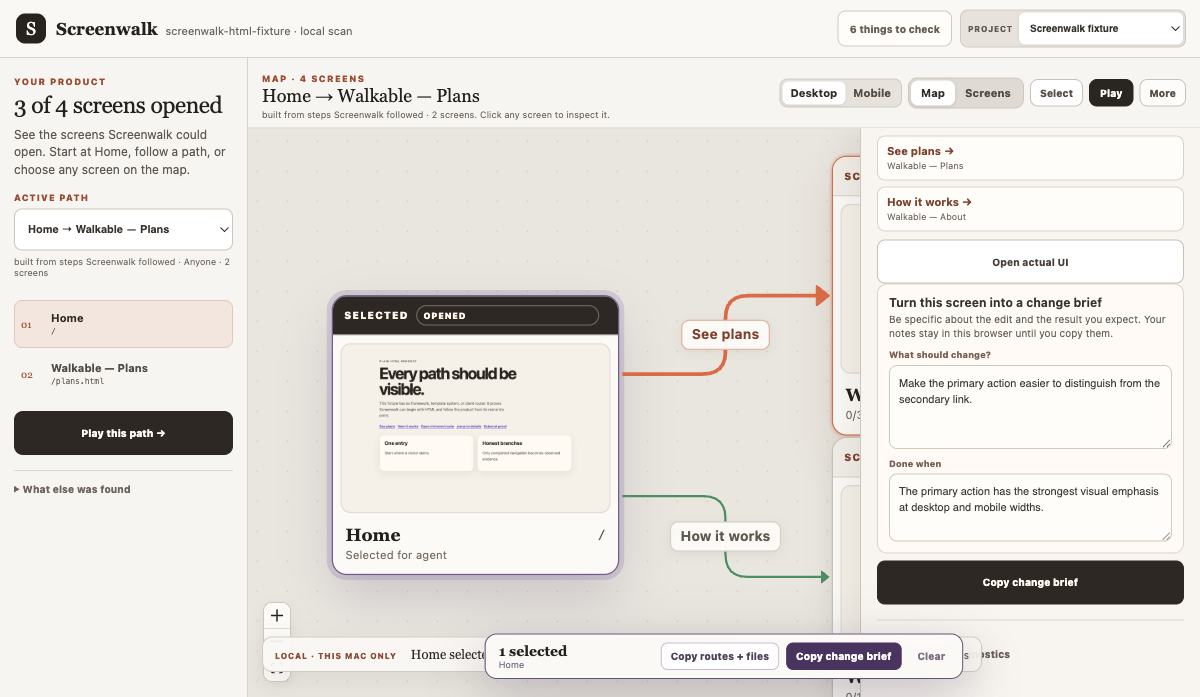
The included synthetic fixture, mapped from localhost: actual screens, entry-reachable paths, an unproven route, and a change brief in one workspace.
AI can add a route faster than you can remember it exists. A redesign can leave an old screen reachable. An auth wall can hide the experience you meant to review. A green build—or an agent saying “it works”—does not prove the UI rendered. A route list tells you files exist; it does not show the product people can actually move through.
Screenwalk turns repository evidence and a running local app into one reviewable map.
Keep your app running, then point Screenwalk at its repository and local URL:
npx screenwalk /absolute/path/to/app --url http://127.0.0.1:3000Screenwalk scans, captures, starts its local Studio, and opens the map in your browser. It does not upload your application or replace its dev server.
Run the five-minute quickstart →
Public beta
Screenwalk is available from npm as a public beta. The command runs locally and writes its evidence into the current project's .screenwalk/ directory. See beta expectations before sharing sensitive captures.